
Saving a useful article is easy; saying any of it aloud is the harder part. MirrorSay's Add sentence tool lets you paste an article, chat or subtitles, or recognise English in screenshots and photos, then select a few lines to favourite and practise.
The goal is not to import an entire library. It is to turn outside material into a small, concrete speaking task.
Option one: paste text, then choose the useful lines
Open Add sentence and paste the text. A single sentence has a direct save-and-practise route. Multiple sentences open a selection view, where you can keep only what you need.
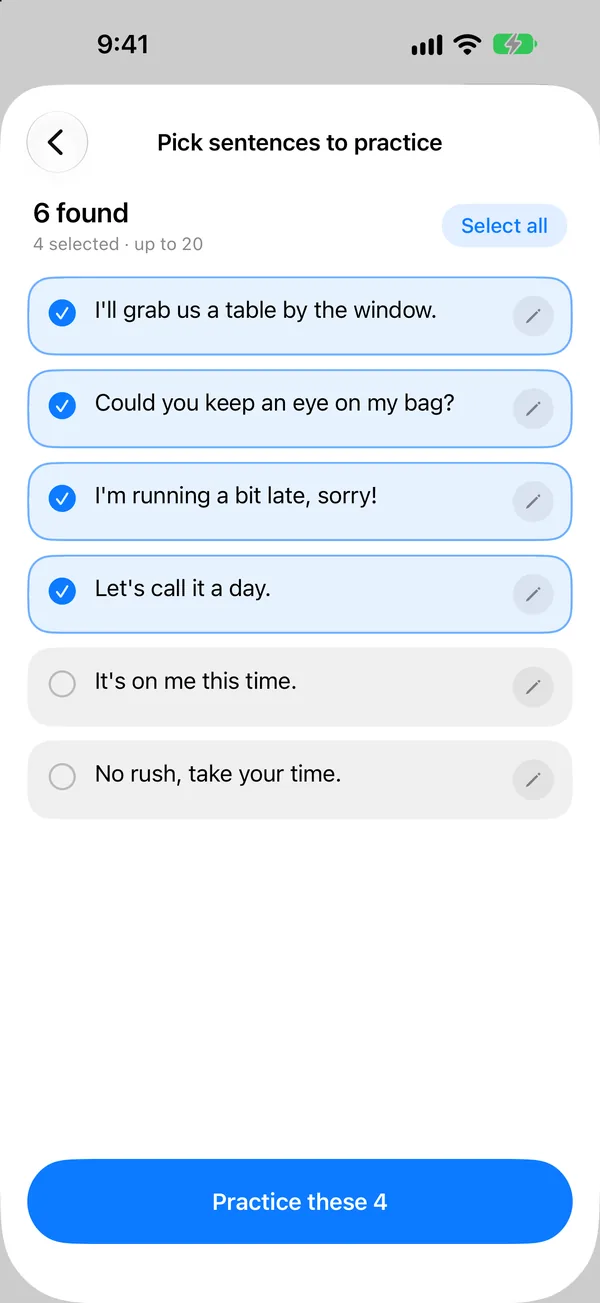
Use three questions to filter:
- Will I use this in a real situation in the next week?
- Can I adapt it to my own information?
- Am I willing to listen, speak and replay it at least once?
Three lines you actually practise beat thirty lines you only collect.
Option two: recognise English in a screenshot or photo
With the input empty, Add sentence offers photo-library and camera options where available. Use screenshots for shows or articles, and the camera for a textbook, menu or computer screen. Allow photo or camera access when the system asks.
For better recognition:
- Keep the whole sentence in the screenshot, including its beginning and end.
- Hold pages flat and avoid shadows, glare and covered words.
- Use clear text with strong contrast; decorative captions and tiny subtitles are harder.
- Choose a few relevant images, then verify every selected line before saving.
OCR extracts text; it does not edit or fact-check it. Remove broken lines, missing words and unrelated labels during selection. For copyrighted articles, lyrics and subtitles, work only within your right to use the material; this is a practice tool, not a republishing tool.
Bilingual subtitles: say it before revealing the line
When English and your language are paired in the source, MirrorSay attempts to pair them too. A successfully paired line can first show the meaning, let you say your version, then reveal the English and highlight what you missed.
This uses the correspondence already present in your material; it does not invent a single official translation. Check that pairs are aligned. Captions often split sentences across screens, and complex layouts may mix in titles or captions. Remove a bad pair or enter the line as plain text instead of practising the wrong match.
Finish one small practice loop
For each selected sentence:
- Read it and identify the situation in which you would use it.
- Listen for its thought groups and tone.
- Shadow it, or speak from the meaning first when a pair is available.
- Compare the target with your recording and choose one adjustment.
- Keep what still needs work; remove what you know or will not use.
If you do not understand the original, look it up before shadowing. Fluency cannot compensate for unclear meaning.
Next, read Shadowing, timing and replay. For one fixed line without paragraph splitting, see Add your own sentence. New users can start with Your first MirrorSay practice.